Website security means protecting your site and its data from cyber threats like hacking, malware, or phishing. Every website, regardless of size or purpose, is at risk if left unsecured. Keeping it safe is critical if your site handles customer information, login details, or payments.
Attackers can damage your business, steal user data, or take your site offline. Website security builds trust with your visitors and helps your brand stay credible. This blog will explain website security, why it matters for everyone, and how you can apply simple steps to protect your site from the most common online risks.
What Is Website Security?
Website security protects your website from cyber threats that can compromise data, disrupt operations, or harm your reputation. It involves implementing measures to prevent unauthorized access, data breaches, malware infections, and other malicious activities.
A secure website ensures that sensitive information, such as user credentials, personal details, and financial transactions, remains confidential and protected from interception or tampering. This is achieved through various security protocols and tools, including HTTPS encryption, firewalls, regular software updates, and secure authentication methods.
Maintaining robust website security is essential for safeguarding your data and building trust with your visitors. A compromised website can lead to significant financial losses, legal consequences, and damage to your brand’s credibility.
Why Do You Need To Secure Your Website?
Your website is the heart of your online presence. If it gets hacked, your visitors, data, and business suffer. Website security isn’t optional anymore. Securing your site should be one of your top priorities right now.
1. To Protect Customer Data
Your customers trust you when they enter their name, email, payment info, or personal details on your site. If your site isn’t secure, that information is at risk. Hackers can steal their data and sell it or use it for fraud. This could lead to identity theft and damage your reputation. By securing your site with SSL encryption, firewalls, and secure databases, you show your customers you take their safety seriously. It builds trust and makes them more likely to return. Protecting data isn’t just good business practice, it’s a responsibility every website owner shares.
2. To Stop Hackers from Taking Control
Hackers can break in and take complete control when your website is unprotected. They can deface your homepage, redirect visitors to harmful sites, or even install malware without your knowledge. Once inside, they might block your access and demand money. They can also use your server to launch attacks on other websites. Keeping your site secure with strong passwords, regular software updates, and two-factor authentication makes it harder for attackers to get in. It’s about locking the digital doors and windows, just like you would at home or work.
3. To Keep Your Reputation Intact
One hack can ruin years of hard work. If your website gets infected or compromised, it affects how people see your business. Visitors will lose confidence in your site, stop coming back, and possibly share their bad experience with others. If Google flags your site as dangerous, even loyal customers may avoid it. Cleaning up the mess after a breach takes time and money, and the damage to your brand may be permanent. A secure website keeps your name clean, and your audience feels safe whenever they visit.
4. To Avoid Expensive Downtime and Losses
A security breach can shut your website down completely. Every minute your site is offline means missed opportunities, lost revenue, and frustrated users. For eCommerce sites, the losses can be even bigger. If attackers install ransomware or corrupt your database, recovery may take days and cost thousands. These situations often require help from an emergency developer or legal services. With solid security in place, you prevent most attacks before they happen. It’s much cheaper to prevent a problem than to fix one. Think of security as insurance for your business operations.
5. To Rank Better on Search Engines
Search engines like Google prefer secure websites. If your site doesn’t use HTTPS, it might show up lower in search results or even display a warning to users. That hurts your traffic and your credibility. Good website security not only protects your visitors but also improves your SEO. Google wants to show users safe content, and a secure site proves you’re trustworthy. If you want more traffic and better visibility online, start by getting the basics right: SSL certificates, malware scanning, and secure hosting. These steps make your site both safer and more findable.
6. To Keep Your Website Running Smoothly
If your site gets attacked, it might crash, slow down, or stop working. Cyberattacks like DDoS floods can overload your server, making your site unreachable for hours. Some attacks run in the background, using your resources without you knowing. This slows everything down and hurts user experience. Security measures like firewalls, traffic monitoring, and server protection help your site stay live and fast. Visitors expect websites to load quickly and work properly. A secure site keeps everything running without interruption, protecting your reputation and daily business flow.
Key Aspects of Website Security
A secure website protects your users, data, and business from online threats. Whether you’re running a blog or an online store, understanding the essential elements of website security helps you prevent hacks, data leaks, and costly downtime.
1. SSL Encryption
SSL (Secure Sockets Layer) encrypts data between your website and users. It prevents hackers from reading sensitive information like passwords or credit card numbers. Websites with SSL show a padlock and start with “https.” Without it, browsers may label your site as unsafe. SSL is essential for building trust and protecting user privacy. It’s also a basic requirement for SEO and online transactions, especially for eCommerce websites and login-based platforms.
2. Web Application Firewall (WAF)
A Web Application Firewall filters out harmful traffic before it reaches your server. It helps block common attacks like SQL injections and cross-site scripting. WAFs are often cloud-based and easy to configure with providers like Cloudflare or Sucuri. By detecting suspicious behaviour early, they prevent exploitation of your website’s vulnerabilities. A WAF adds a strong layer of protection, especially for sites with login systems, forms, or user-generated content.
3. Software and Plugin Updates
Outdated software is one of the most significant entry points for attackers. Hackers constantly scan the internet for bugs in platforms like WordPress, Joomla, or Magento. Keeping your CMS, plugins, and themes up to date closes these security holes. Many updates fix critical vulnerabilities. You should also remove unused plugins to reduce risk. If your hosting provider offers automatic updates, enable them to ensure you’re always protected against the latest threats.
4. Strong Password Policies
Weak passwords are easy targets for brute-force attacks. Always use complex passwords combining letters, numbers, and symbols. Set password requirements for all users on your site, especially admins. Avoid default login names like “admin” and change them if needed. Adding two-factor authentication provides extra protection by requiring a second verification step, like a code sent to your phone. Password strength plays a significant role in keeping your site secure.
5. Daily Backups
No system is perfect, so backups are your safety net. Set up automated backups that save your whole site, files, and databases daily or weekly; store copies offsite or in the cloud to avoid losing everything if your server fails. In case of hacking, malware, or accidental deletion, a clean backup lets you restore your site quickly. Without backups, recovery can be time-consuming and sometimes impossible.
6. Malware Scanning and Cleanup
Malware can hide in your site’s files and go unnoticed for weeks. Regular malware scanning detects harmful code, phishing scripts, or injected links. Security tools like Wordfence, Sucuri, or Jetpack monitor your site 24/7. If malware is detected, act fast to remove it. Leaving infected files on your site puts your users at risk, and your domain can be blocked by Google or flagged by browsers.
7. Secure Hosting Environment
Your web host plays a significant role in your site’s security. Choose a provider that offers features like firewall protection, DDoS mitigation, and regular server updates. Shared hosting can expose your site to risks if other sites on the server get hacked. Managed hosting or VPS options provide better isolation and control. A secure host is your first line of defence, so don’t pick the cheapest option without checking their security track record.
8. User Role Management
Not everyone needs full access to your site. Set up role-based permissions to control what users can see and change. For example, editors should not be able to install plugins, and contributors should only access content areas. This limits the risk of accidental errors or abuse. CMS platforms like WordPress make it easy to assign roles. Keeping roles tight ensures your team can work efficiently without exposing sensitive areas.
How To Secure Your Website?
Securing a website today involves more than just installing a plugin or an SSL certificate. Attack surfaces are growing, and real-time threats like zero-day vulnerabilities, DDoS attacks, and automated bots require layered, proactive defences. Here’s how to technically secure your website from top to bottom.
1. Enforce HTTPS Using TLS (SSL)
Every secure website must use HTTPS. Implement Transport Layer Security (TLS) by obtaining a valid SSL certificate from a Certificate Authority (CA). Free CAs like Let’s Encrypt provide domain-validated (DV) certs, which you can auto-renew using Certbot.
Steps:
- Install Certbot: sudo apt install certbot python3-certbot-nginx
- Run: sudo certbot –nginx
- Redirect HTTP to HTTPS in your server block:
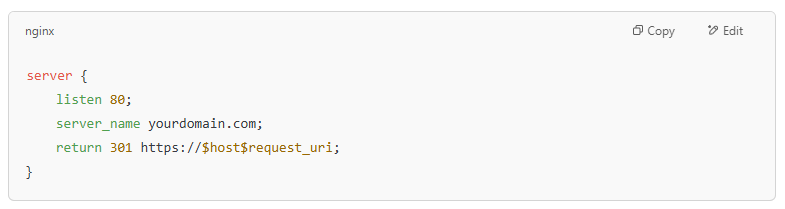
TLS protects data in transit and is a ranking signal in Google’s search algorithm. Monitor expiry using tools like Cron + Certbot or cloud-based alerting systems.
2. Harden Server Configuration
Misconfigured servers are low-hanging fruit for attackers. Use security headers to prevent exploits like XSS, clickjacking, and MIME-type sniffing.
Add the following headers in your NGINX config:
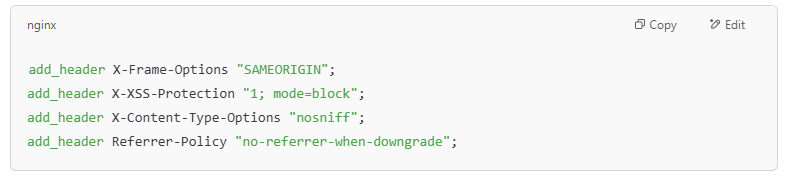
Disable directory listing and unused modules, and restrict access to sensitive files like .env, .git, or config files. Disable root login over SSH and change default ports where feasible.
3. Set Up a Web Application Firewall (WAF)
A WAF inspects incoming HTTP traffic for known attack signatures. It filters out bad requests before they reach your web application layer.
Popular Options:
- Cloudflare WAF: Easy setup via DNS and protects from OWASP Top 10 attacks.
- ModSecurity (Apache/Nginx): Install and configure with OWASP CRS.

WAFs can also mitigate Layer 7 DDoS attacks and detect malicious bots in real time.
4. Implement Secure Authentication and Authorization
Weak authentication is a common entry point. Enforce the following:
- Use bcrypt or Argon2 for password hashing.
- Implement rate-limiting on login endpoints (e.g., Fail2Ban or Nginx limit_req).
- Add Two-Factor Authentication (2FA) via TOTP or SMS.
- Use JWT or OAuth2 for session and API authentication, with proper expiry and refresh token policies.
Apply Role-Based Access Control (RBAC) or Attribute-Based Access Control (ABAC) to limit user privileges across your app and backend systems.
5. Perform Regular Vulnerability Scanning
Use both automated and manual tools to assess your site’s security posture. Tools like:
- Nessus for network vulnerabilities
- OWASP ZAP or Burp Suite for web app scanning
- Nikto for known misconfigurations and outdated components
- ClamAV or Linux Malware Detect for file-level malware scanning
Scan after every deployment or CMS/plugin update. Integrate with your CI/CD pipeline for shift-left security.
6. Keep Software, CMS, and Plugins Updated
Every CMS and its ecosystem of plugins, themes, and extensions must be patched regularly.
Automate using tools like:
- WP-CLI for WordPress:

- Composer for PHP libraries
- npm/yarn for JavaScript packages
Subscribe to CVE feeds or GitHub advisory alerts to track vulnerable components in your stack.
7. Enable Logging and Real-Time Monitoring
Log all requests, authentication attempts, file changes, and server errors. Use tools like:
- Fail2Ban: Ban IPs after repeated failed logins.
- Logwatch or GoAccess: Analyze logs for anomalies.
- ELK Stack: Centralized log analysis for enterprise-level monitoring.
Forward logs to a SIEM like Wazuh, Splunk, or Graylog for correlation and alerting.
8. Set Up Automated Backups and Disaster Recovery
Backups are your last defence. Automate daily backups of files and databases using:
- Rsync + Cron: To remote storage or S3.
- Rclone: For multi-cloud sync.
- BorgBackup: With encryption and deduplication.
Test your backups monthly by restoring them in a staging environment. Store at least one off-site backup encrypted using GPG or AES-256.
Common Website Security Threats
Websites are constant targets for cyber threats. It doesn’t matter if you’re running a personal blog or a large business site, attackers are always scanning for weaknesses. Knowing the most common threats helps you prevent attacks before they happen. Below are seven key website security threats you should be aware of.
1. SQL Injection (SQLi)
SQL injection is one of the oldest and most dangerous web vulnerabilities. It happens when attackers insert malicious SQL queries into input fields like login forms, search boxes, or contact forms. If your site doesn’t properly validate or sanitize inputs, the attacker can access your database, steal sensitive data, or even delete it.
For example, a login form without protection could let someone bypass authentication by injecting ‘OR 1=1 –. Protect your site using parameterized queries or prepared statements and always validate user inputs.
2. Cross-Site Scripting (XSS)
Cross-site scripting allows attackers to inject malicious scripts into your website that execute in other users’ browsers. These scripts can steal cookies, redirect users, or show fake forms to capture login data.
XSS comes in three forms: stored, reflected, and DOM-based. It’s especially dangerous on pages with user-generated content, like blog comments or forums. To prevent XSS, all user inputs must be escaped before rendering them, Content Security Policy (CSP) headers must be used, and data must be sanitized on both the server and client sides.
3. Cross-Site Request Forgery (CSRF)
CSRF tricks users into performing actions they didn’t intend. For example, if a user is logged into your site and clicks a malicious link elsewhere, it could trigger an action like changing their password or submitting a form, without their knowledge.
CSRF tokens are the standard protection method. These are unique values attached to forms or requests that the attacker can’t guess. Most modern frameworks include CSRF protection by default, but you should always confirm it’s active and working.
4. Distributed Denial of Service (DDoS) Attacks
A DDoS attack floods your website with traffic until it becomes slow or crashes entirely. Attackers use botnets, which are large networks of infected devices, to overwhelm your server. These attacks don’t always involve hacking your site, but they can still take it offline and cost you visitors, sales, or reputation.
To defend against DDoS, use a Web Application Firewall (WAF), rate-limiting rules, and Cloudflare or AWS Shield services. These can absorb and filter traffic before it hits your server.
5. Brute Force Attacks
Brute force attacks happen when hackers try to guess your login credentials by testing thousands of username and password combinations. They often target admin panels, CMS logins, or FTP access.
To prevent this, enforce strong passwords and enable account lockouts after a few failed attempts. Use two-factor authentication (2FA) and consider hiding your login URLs or limiting access by IP address. Security plugins like Wordfence (WordPress) or Fail2Ban on Linux servers are very effective here.
6. Malware Infections
Malware can be silently installed on your website if attackers access your server or exploit vulnerabilities. Once inside, malware can steal data, redirect users to malicious sites, or infect visitors’ devices.
Common signs include strange redirects, pop-ups, or your site being flagged by Google. Use file scanning tools to prevent infections, regularly update your software, and clean up unused plugins or themes. Hosting providers like SiteGround, Kinsta, or Hostinger often include malware scanning features.
7. Insecure File Uploads
Allowing users to upload files can open a huge security hole if mishandled. Attackers may upload scripts disguised as images or documents, then execute those scripts to control your server or site.
To stay safe, always validate file types and sizes. Store uploads in a separate directory with limited permissions. Never allow direct access to uploaded files, and rename them to random values to avoid conflicts or hidden scripts running unnoticed.
Conclusion
Website security protects both your business and your visitors. Without it, your site can be exposed to attacks that steal data, crash your system, or damage your reputation. You don’t need to be a tech expert to take action. Small steps like enabling SSL, running updates, using strong passwords, and setting up regular backups can make a big difference.
Protecting your website is not just a one-time task but an ongoing responsibility. A secure site keeps your content safe, your visitors confident, and your business running without disruption. Take control of your website’s safety today and stay ahead of the threats.